 orca.flo
Pipeline
A CRM that fills itself from your chats
Nobody has to type leads in. Every conversation becomes a lead on your board, moved along as the assistant learns more, with everything the customer said one click away.
Short answer
OrcaFlo’s pipeline fills itself: every conversation becomes a lead with a stage and a Hot, Warm or Cold temperature, set by the assistant from what the customer says. Move leads on a board, filter and segment your contacts, export a CSV any time, or sync leads to HubSpot, Zoho CRM or Google Sheets.
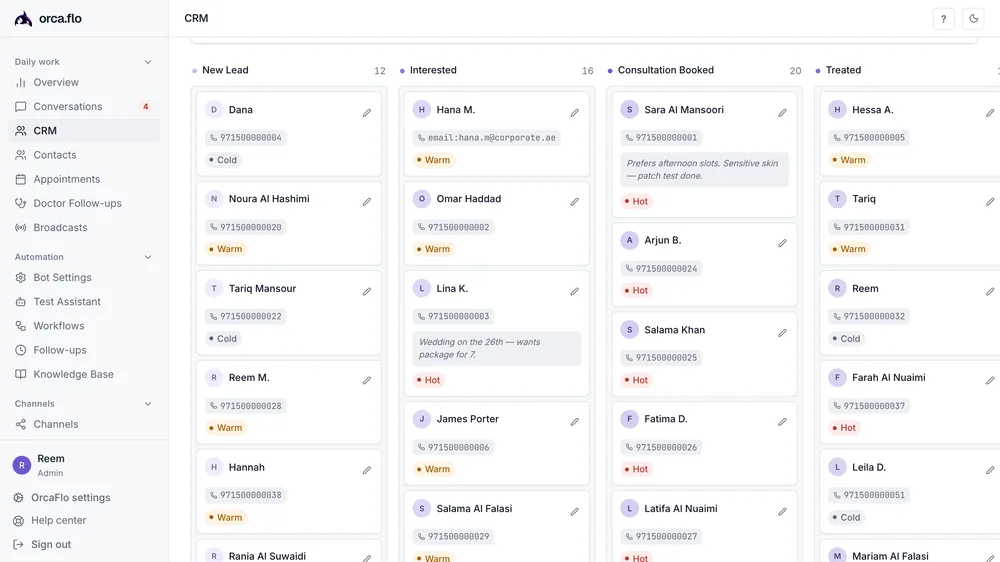
A board for every stage
See your leads in columns, from New to Booked, and move them yourself when you need to.
Your own stages
Your stages are set for your type of business, and we can change them to match how you sell.
Escalations on top
Leads waiting for a person are listed first, with the reason.
Export
Download your leads as a CSV any time.
Filled in from the chat
The assistant keeps each lead up to date while it talks.
Temperature
Hot, Warm or Cold, set from what the customer says and updated as they say more.
Fields the assistant fills
Add fields like “Budget (AED)” or “Treatment interest” as text, number, date, yes/no or a dropdown, and tick the ones the assistant should fill from the conversation. Once a person sets a value, the assistant never overwrites it.
Activity timeline
Conversations, stage changes, tags, bookings, orders, broadcasts, follow-ups and notes, newest first, also shown next to the chat.
Contacts, tags and segments
Everyone who has messaged you, on any channel, in one list.
Tags
Your own, like “VIP” or “Wholesale”, added to many contacts at once.
Filters and segments
Filter by stage, temperature, tag, source, last message or any of your fields, and save the filter as a segment for broadcasts and workflows.
Import
Upload a CSV of up to 50,000 rows. Imported contacts aren’t messaged until they write to you or you send them something.
Your data, any time
Admins can download everything as spreadsheet files in one ZIP.
Sync to your tools
Leads and updates can flow to HubSpot, Zoho CRM or Google Sheets. Salesforce and Pipedrive are coming soon.
HubSpot
A contact with stage, temperature, source and a link to the chat. Each conversation is a note, qualified leads become a deal, and name, email and address changes in HubSpot come back.
Zoho CRM
A lead, with each conversation as a note, converted into a contact with a deal when it is qualified. Works in every Zoho region, including the UAE and Saudi Arabia.
Google Sheets
No CRM? OrcaFlo keeps a sheet with a row for every new lead and every order, within a minute.
Zapier, Make and n8n
Send leads into OrcaFlo, or react to new contacts, messages, bookings and payments in thousands of other apps.
Questions people ask
Do I have to type leads in?
No. Every conversation on every channel becomes a lead by itself, and the assistant updates its stage, temperature and the fields you choose as the chat goes on.
Does it work with the free HubSpot or Zoho CRM plans?
Yes. The free plans of HubSpot and Zoho CRM work. Salesforce and Pipedrive are coming soon.
Will syncing create duplicate records in my CRM?
No. Before creating a record, OrcaFlo looks for one with the same phone number or email and uses it.
Can I change the pipeline stages?
Your stages are set for your type of business, and we can change them to match how you sell. You can always move a lead yourself.