 orca.flo
Unified inbox
Every conversation, in one inbox
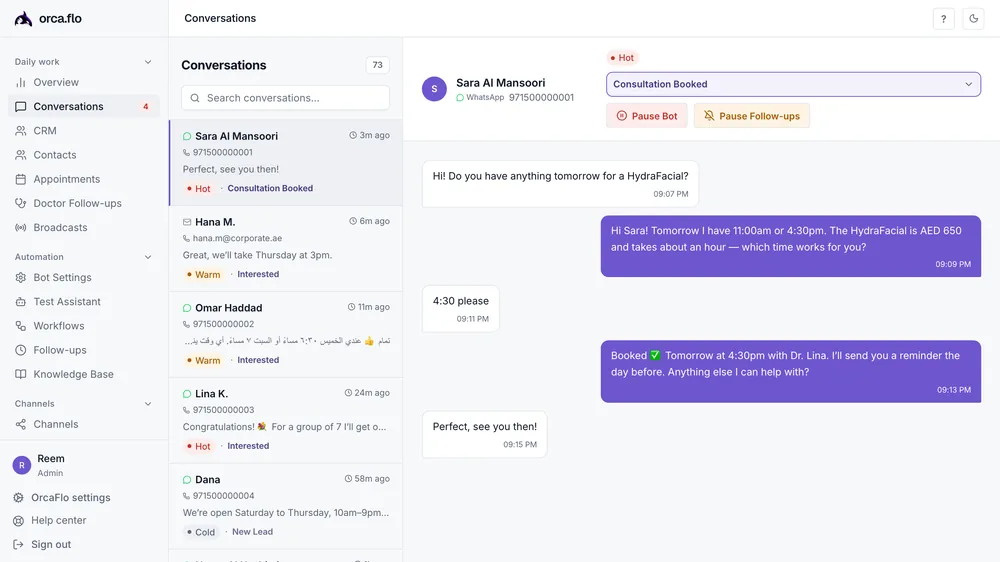
See what the assistant said, who is waiting for a person and which leads are hot, across every channel, on your computer or your phone. Website chats, Instagram DMs, emails and Telegram messages sit next to your WhatsApp chats, so nobody has to check six apps.
Short answer
OrcaFlo’s inbox puts every WhatsApp, Instagram, Messenger, website chat, email and Telegram conversation in one place, on your computer or your phone. Each chat shows the lead’s temperature and stage, chats handed to your team are marked with a summary, and you can pause the assistant for any customer and reply yourself.
Built for taking over
Open any conversation and reply yourself. Press Pause bot to step in, and Resume bot to hand it back. Replying from the OrcaFlo inbox pauses the assistant for that customer too, and so does a reply you type in the WhatsApp Business app when you keep the app on the Official API.
Lead temperature and stage
Hot, Warm or Cold, and where each lead is in your pipeline.
Waiting for a person
Chats the assistant handed over are marked, with a summary.
On your phone
Add OrcaFlo to your Home Screen and get a notification when someone needs you.
One customer, every channel
The same person might write on WhatsApp, Instagram and by email. Merge them into one contact and click All channels to see every message on one timeline. Your reply goes out on the channel of the conversation you opened.
The assistant remembers
For a merged customer, the assistant sees a short summary and recent messages from their other channels, so it doesn’t ask again. Phone numbers and emails in those messages are hidden from it.
You decide who to merge
OrcaFlo suggests people who share a phone number or email. Nothing is merged automatically, and any merge can be undone.
AI help while you reply
When you take over a chat, AI Assist works next to the message box. Nothing is sent until you press Send.
Draft reply
A draft from your knowledge base, products, prices and free booking slots. It reads voice notes and can look at the photo the customer just sent.
Rewrite
Friendlier, more formal, shorter or simpler, spelling fixed, or translated into Arabic, English, Hindi, Urdu, French or Russian.
Summary
What the customer wants, what was agreed and the best next step, for when you pick up a chat someone else started.
Alerts when someone needs you
When the assistant hands a customer to your team, OrcaFlo alerts you on your phone or computer. Each person turns alerts on for each device. For new businesses, if nobody has alerts on, OrcaFlo emails your admins instead, so nobody is missed.
Every alert in one place
The bell in the top bar shows how many alerts you haven’t read. See all opens the Notifications page, with every alert OrcaFlo sent your business from the last 180 days, grouped by day, so nothing is lost when a phone alert is swiped away.
Filter by kind
Chats and escalations, orders and payments, bookings, WhatsApp status and billing (admins only).
One tap to the cause
Open a notification and you land on the chat, order, booking or page it is about.
For teams
Give each team member their own login and role, and hide customers’ phone numbers and emails from staff if you need to. Assigning chats to people and team routing are available on request, together with internal notes, snooze and close.
Go live gently
Shadow Launch, in early access: for your first days the assistant drafts each reply in the inbox and a person sends, edits or skips it. Topics switch to automatic once the drafts are reliably right.
Questions people ask
Do replies I type on my phone pause the assistant?
Yes. On the Official WhatsApp Business API with Connect and keep the app, a reply you type in the WhatsApp Business app pauses the assistant for that chat. You can also reply from the OrcaFlo inbox or press Pause bot to step in, and Resume bot to hand the chat back.
Can I use the inbox on my phone?
Yes. Add OrcaFlo to your Home Screen and turn on notifications on each device. On iPhone, alerts only work from the Home Screen app, not from a Safari tab.
Can my whole team use it?
Yes. Each person gets their own login and role, and the price is per message, not per person. Assigning chats to people and team routing are available on request.
What happens when the assistant hands a chat over?
It pauses itself for that customer, marks the chat as waiting for a person with a short summary, and alerts your team. If nobody hands it back, it resumes by itself after 7 days.