 orca.flo
Broadcasts
Send the right offer to the right customers
Broadcasts let you announce an offer, a new product or a holiday schedule to your customer list, without sending it all at once. Pick who gets it, send now or later, and let the assistant handle the replies.
Short answer
OrcaFlo sends a WhatsApp broadcast to the customers you choose, like past buyers, Hot leads or a saved segment, now or at a set time. Messages go out one at a time with a pause between them, and by default not at night, to protect your number. The assistant answers replies, and you see each person’s result.
Paced by default
Messages go out with a gap between them, and nothing is sent in quiet hours at night. That protects your number from looking like spam.
A pause between messages
15 minutes by default. Longer pacing is safer for big lists.
Quiet at night
By default nothing goes out between 9pm and 9am in your time zone. A message that falls in that window waits until it ends. You can change the hours on the Broadcasts page.
Choose who gets it
Send to the people an offer is actually for.
Leads by temperature
All leads, or only Hot, Warm or Cold ones.
Hand-picked
Choose people one by one.
Saved segments
Like VIPs or customers tagged with one treatment. A segment is worked out when the broadcast sends, so it includes anyone who joined it in the meantime.
People who never wrote to you
Segments leave out contacts who never messaged you, such as imported ones, unless you tick the box. WhatsApp often blocks numbers that message people who never wrote first.
Write it once, send now or later
Give the broadcast a campaign name only you see, write the message and attach a photo or a file if you like.
When I press Send
Keeps it as a draft until you send it.
At a set time
Sends on its own at that time. Cancel the schedule any time before it starts.
Replies are answered
When customers reply to a broadcast, the assistant answers them like any other chat. You can tell it to answer with the broadcast in mind, or have a person answer those chats instead.
See how each broadcast did
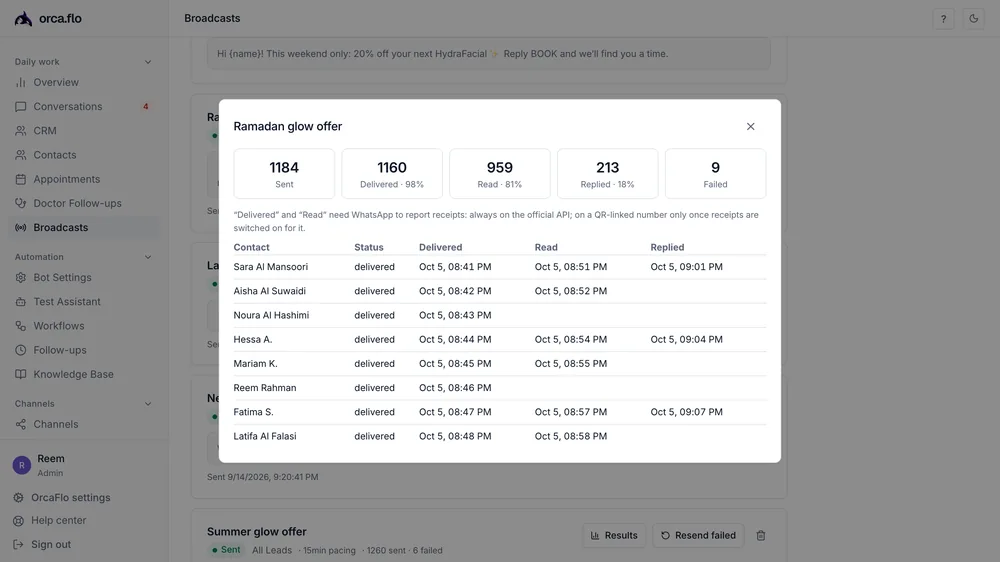
Open Results on a sent broadcast for the totals and a status for every person.
Sent, delivered, read and replied
Delivered and read come from the receipts WhatsApp reports.
Resend failed
If some messages failed, for example a number that isn’t on WhatsApp, resend to just those people. Nobody gets it twice.
Reports
The Broadcasts tab in Reports compares every broadcast: sent, failed, and how many customers replied within 48 hours.
Questions people ask
Can I schedule a WhatsApp broadcast?
Yes. Choose At a set time and it sends on its own. Until it starts you can cancel the schedule, change the message and schedule it again.
How does OrcaFlo protect my number when I broadcast?
Messages go out one at a time, 15 minutes apart by default, and by default nothing is sent between 9pm and 9am. Segments leave out people who never messaged you unless you include them. Spam-like sending can still get a number limited, so send to people who expect to hear from you.
Who answers when customers reply?
You choose: the assistant answers knowing what the broadcast said, the assistant answers as usual, or a person answers and the assistant stays quiet for those chats.
Can I send broadcasts on Instagram?
No. OrcaFlo doesn’t send broadcasts on Instagram, where replies go out within 24 hours of a customer’s last message. Broadcasts go out on WhatsApp.