 orca.flo
Describe a workflow in your own words
Not sure which steps you need? Tell OrcaFlo what should happen, like you would tell a new colleague, and it builds a draft for you.
Updated
How to do it
Open Workflows
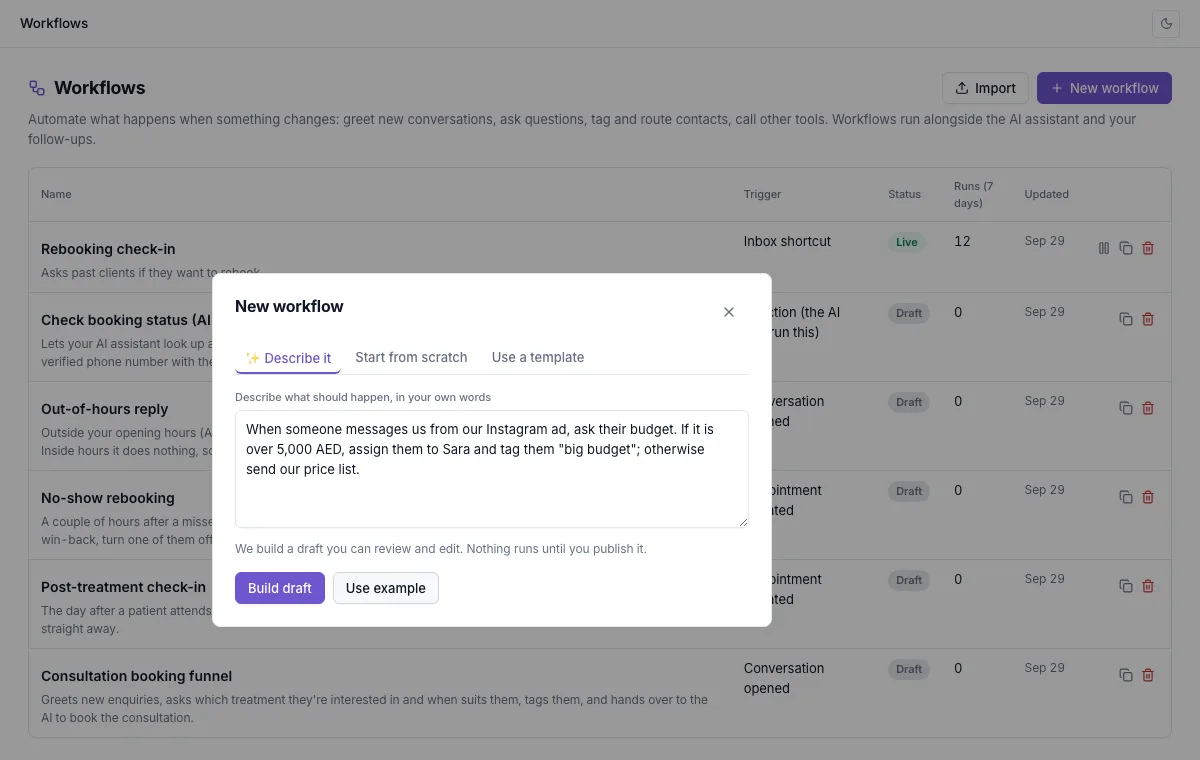
Click New workflow. Describe it is the first tab.
Write what should happen
Say what starts it, what to ask or send, and what to do with the answers. For example: “When someone messages us from our Instagram ad, ask their budget. If it is over 5,000 AED, assign them to Sara and tag them big budget; otherwise send our price list.”
Click Build draft
A few seconds later the draft opens in the editor, with a note of anything you still need to fill in, such as your price list or a teammate.
Check, test and publish
Read each step, change what you like, use Test, then Publish. Nothing runs until you publish.
Tips for a good draft
Name people and tags
Use your teammates’ names as they appear in your panel, and the tags you want added.
Say what happens otherwise
“If… otherwise…” gives you both paths in one go.
Keep facts out
OrcaFlo never makes up prices or links. Where it needs one, it leaves a clear placeholder for you to fill in.
Not seeing Workflows?
If you don’t see this in your panel yet, email support@orcaflo-panel.com and we’ll switch it on for your business.
Questions
No. It only creates a draft. Nothing reaches your customers until you publish it.
Edit it in the editor like any other workflow, or describe it again with more detail.