 orca.flo
Let your AI assistant run workflows
An AI action is a workflow your AI assistant can run during a conversation when the customer needs it, for example “where is my order?”. It runs the workflow, gets the answer and replies with it.
Updated
Set one up
Create a workflow
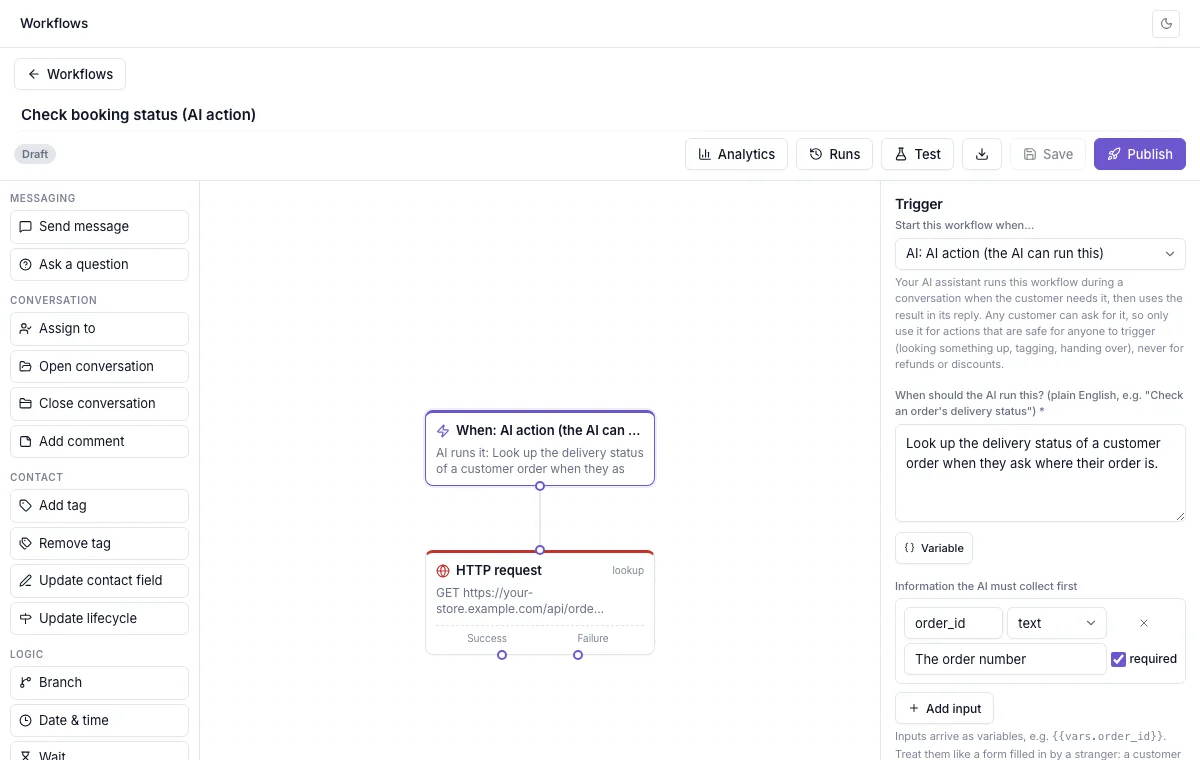
Start from the Order status (AI action) template, or choose the trigger AI action (the AI can run this).
Say when the AI should use it
In plain words, for example “Look up the delivery status of an order when a customer asks where their order is”.
List what the AI must collect first
For example the order number. The AI asks the customer for anything it doesn’t have yet.
Add the steps and say what to give back
For example an HTTP request to your shop system that saves the status, and Variables to give back to the AI: only these are shared with the AI.
Test and publish
Once published, the AI can use it in any conversation.
Keep it safe: treat it like a public form
Any customer can ask your AI for an action, and they can type anything, including someone else’s order number. So only turn things into AI actions that are safe for anyone to trigger: looking up information, tagging, handing over to your team. Never refunds, discounts or changes to someone’s account.
For look-ups, make sure a customer can only see their own information. Send the customer’s phone number with the request (add {{contact.phone}} to the web address, as the Order status template does) and have your system check that the order belongs to that number. The phone number comes from WhatsApp itself, so the customer can’t fake it.
Phone and email inputs are always the customer’s own by default: whatever they type, OrcaFlo uses the number they are messaging from. The editor warns you if a look-up uses something the customer typed without also sending their phone number.
Good to know
Only what you allow
The AI only sees the variables you list under Variables to give back to the AI, never anything else from your system.
One at a time
The AI runs at most one action per message, and each action at most 10 times an hour for the same customer.
You can check every call
Open the workflow’s Runs: each one shows it was started by the AI assistant, with the details it used.
Not seeing Workflows?
If you don’t see this in your panel yet, email support@orcaflo-panel.com and we’ll switch it on for your business.
Questions
The AI is told the action didn’t work and tells the customer your team will check. Technical details are never shown to the customer.
It is told to pass on only what your system returned, and to say your team will check if that doesn’t answer the question.