 orca.flo
A different first message for each ad (ad openers)
People who tap your ad expect you to talk about that ad. An ad opener sends a first message made for it, or tells your assistant what to say about it, so the chat starts on the right foot.
Updated
Set up an ad opener
Open Channels
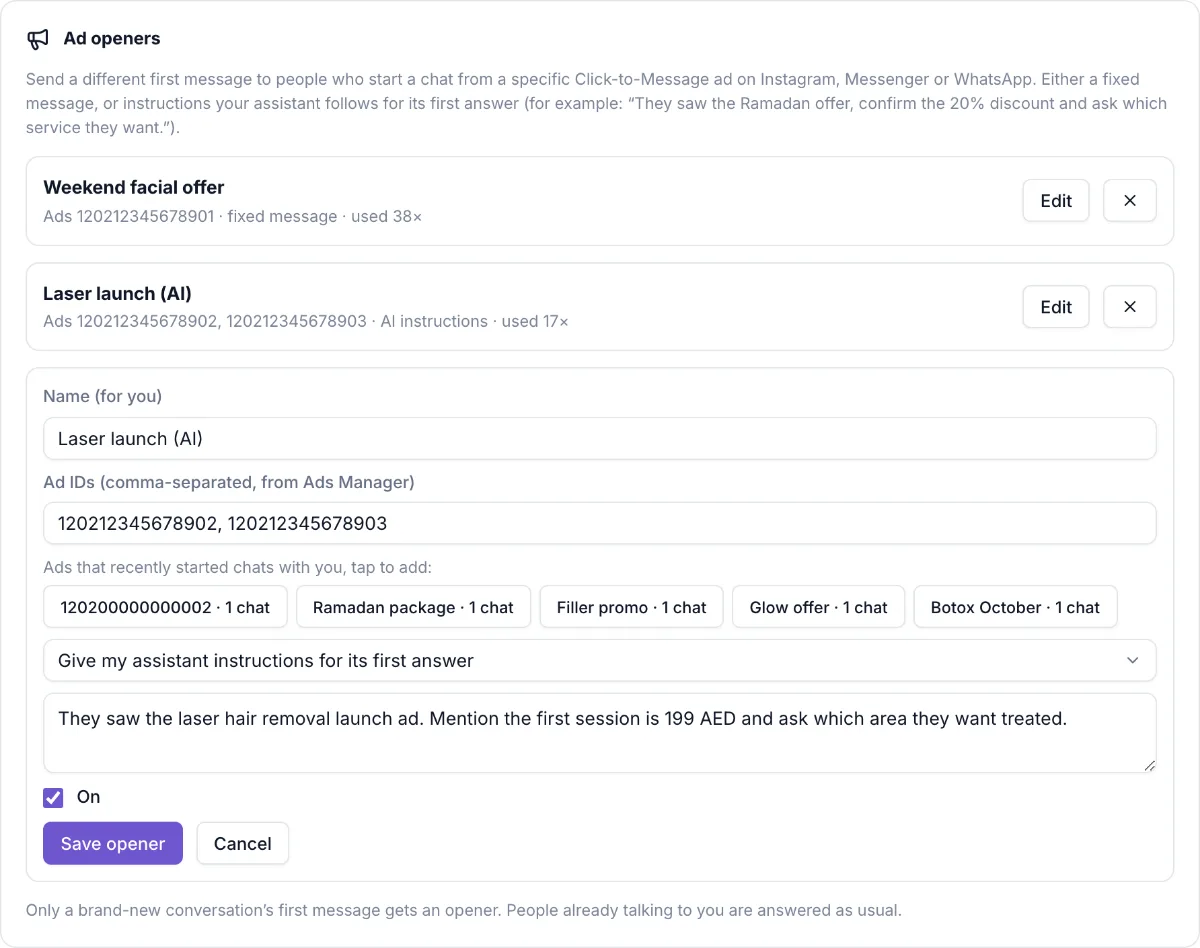
In Channels, find Ad openers and click Add ad opener.
Name it and add the ad
Give it a name you’ll recognize. Paste the ad ID from Meta Ads Manager, or tap one of the ads that recently started chats with you. One opener can cover several ads.
Choose what happens
Send this exact first message, for example the offer and a question. Or Give my assistant instructions for its first answer, for example “They saw the 20% facial offer. Confirm it and ask which day suits them.”
Save
Click Save opener. The card shows how many chats each opener has started.
Good to know
New chats only
Only the first message of a brand-new conversation gets an opener. People already talking to you are answered as usual.
WhatsApp works today
Click-to-WhatsApp ads work on your current WhatsApp number. Instagram and Messenger ads work once those channels are connected.
Not seeing Ad openers?
If you don’t see this in your panel yet, email support@orcaflo-panel.com and we’ll switch it on for your business.
For Instagram and Messenger ads: Coming soon: this works once OrcaFlo’s Meta approval is complete. Email support@orcaflo-panel.com to be told first.
Questions
In Meta Ads Manager, open the ad; the ID is the long number in the ad’s details. Easier: run the ad, and once people start chats it appears in the list of recent ads to tap.
Your assistant answers as usual.