 orca.flo
Get a weekly summary of your business by email
Every Monday morning OrcaFlo can email you a one-page summary of last week, so you know how things are going without opening the panel.
Updated
Choose what you get
Open Reports
At the top of the page you see Email me a summary at … with your email address.
Turn on what you want
Every Monday sends last week’s summary. Every morning sends yesterday’s. Days with no conversations are skipped, so you don’t get empty emails.
Check your inbox
Emails arrive after 9:00 in your business’s time zone. Each person on your team chooses for themselves.
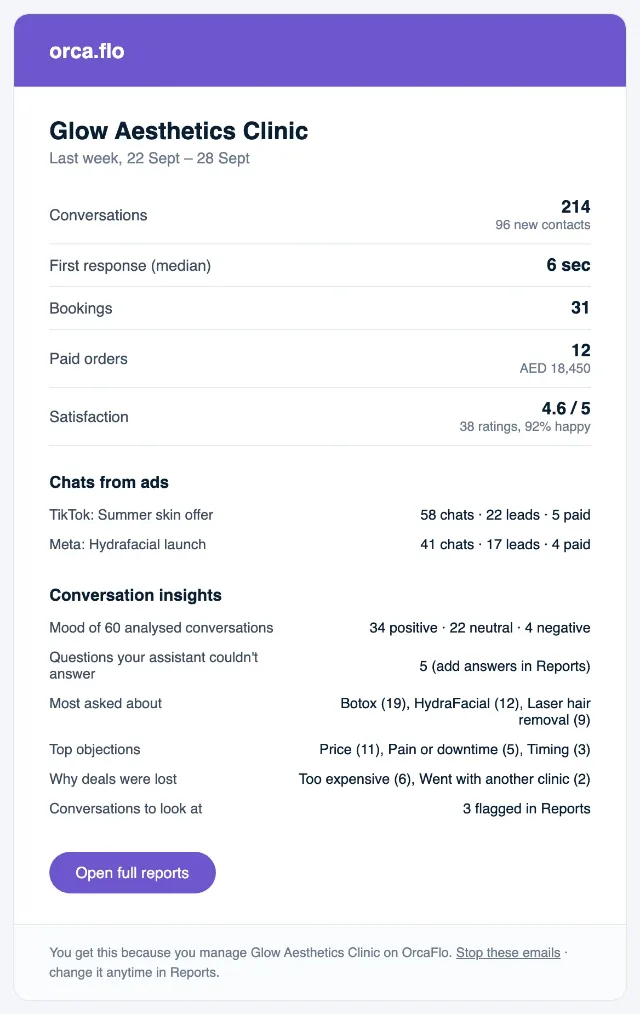
What’s in it
- Conversations, and how many were new contacts
- How fast customers got their first reply
- Bookings, paid orders and revenue
- Satisfaction ratings, if you use surveys
- Which ads brought chats, leads and sales
- Highlights from conversation insights, if you use them
Good to know
Who gets it
Admins and managers get the Monday summary automatically once report emails are on for your business. The morning email is off until you tick it.
Stopping it
Turn off Every Monday and Every morning in Reports, or click Stop these emails at the bottom of any summary and confirm.
Privacy
The emails never include customers’ phone numbers or messages.
Not seeing it?
If you don’t see this in your panel yet, email support@orcaflo-panel.com and we’ll switch it on for your business.
Questions
Yes. Tick every morning in Reports. You get yesterday’s numbers, except on days with no conversations.
Yes. Admins and managers each choose for themselves when they open Reports.