 orca.flo
Reply to emails from the inbox
Email conversations sit in Conversations next to your WhatsApp chats. Each message shows the details of the email, and you can reply like you would in your mail app.
Updated
What you see on each email
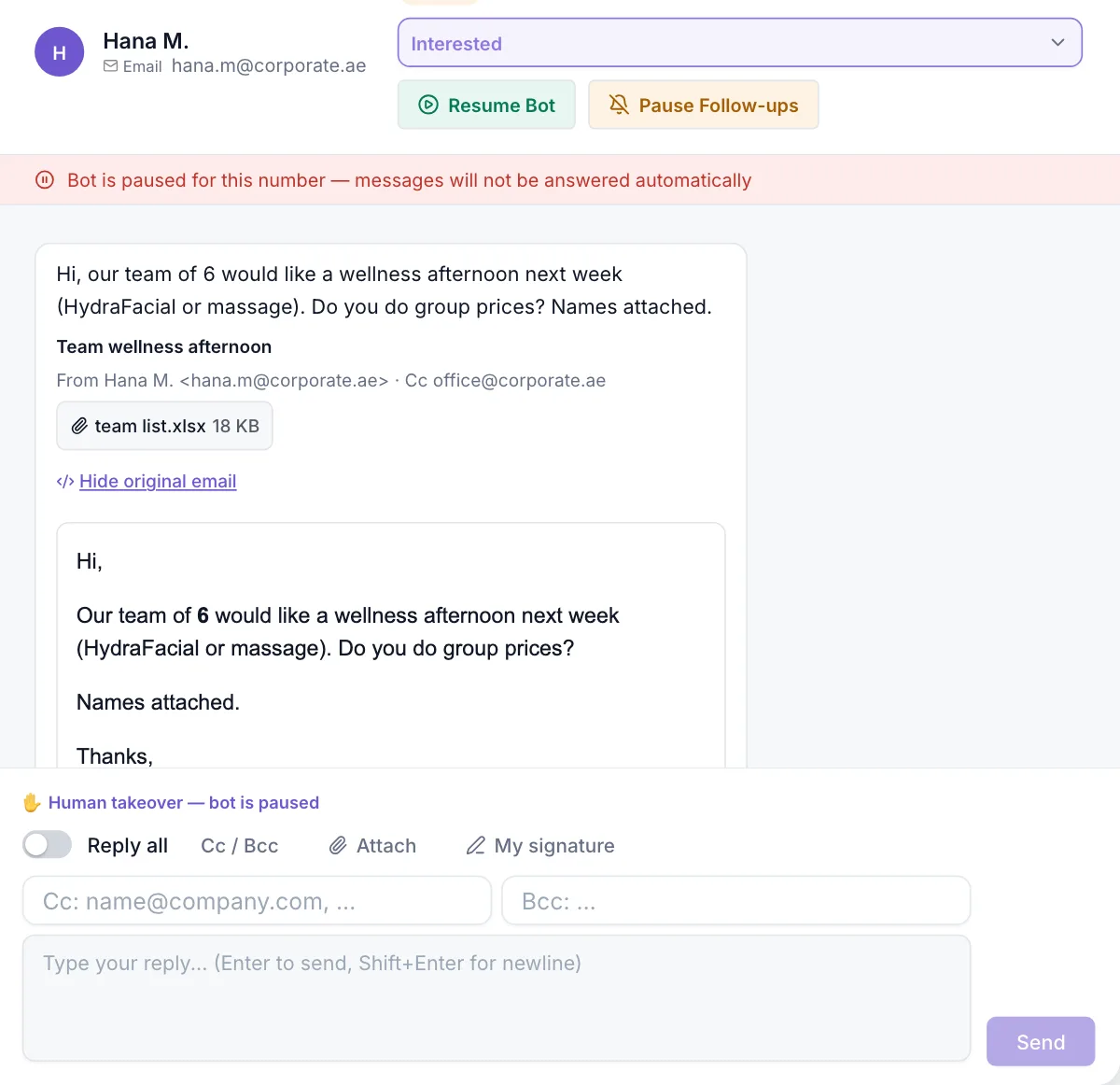
- The subject, who it’s from and who else was copied (Cc), plus Bcc on the emails your team sent.
- Attachments as chips: click one to download it. Files over 10 MB are listed but not stored.
- Show earlier messages opens the quoted history under a reply, so long threads stay short.
- View original email shows the email as it was designed. Scripts, tracking pixels and unsafe links are removed first, so opening it is safe.
Reply
Take over the chat
Click Human Takeover so the AI assistant stops answering while you write.
Choose who gets it
Turn on Reply all to include everyone who was copied. Click Cc / Bcc to add more addresses.
Attach files
Click Attach. Each file can be up to 10 MB, and up to 20 MB in total.
Check your signature and send
Your own signature is added under your reply. Set it once with My signature. The reply goes out in the same thread, from your business address.
Good to know
Team signatures
Admins can set everyone’s signature in Channels → Email under Team signatures. Without one, the mailbox signature is used.
AI replies
The AI assistant always replies to the sender only, with the mailbox signature, and marks its emails as automatic replies.
Hidden contact details
If your admin hides customer contact details, agents see a label instead of email addresses. Reply all still works: OrcaFlo fills in the real addresses.
Bcc stays private
The customer and Cc’d people never see who was on Bcc.
If you don’t see this in your panel yet, email support@orcaflo-panel.com and we’ll switch it on for your business.
Questions
Yes. It is saved in the mailbox’s Sent folder, so the thread looks complete in your mail app.
Replies continue the customer’s latest thread. To email many customers at once, use Broadcasts: email broadcasts include an unsubscribe link.
Files over 10 MB, or more than 20 files in one email, are listed but not stored. Ask the customer to send a smaller file or a link.